Seat Gauge
A small Mac window that shows how much of each AI subscription you've used, and which one to work on next.

What it does
If you pay for more than one AI subscription, say a couple of Claude plans and a ChatGPT one, each has its own limits. There is a five-hour allowance and a weekly one, and they run out and refill at different times.
Seat Gauge is a small Mac window that keeps all of them in view. Each login gets a card with two bars, one for the five-hour allowance and one for the week, and a countdown to when each refills. The login with the most room left gets a USE tag, so you know where to start your next piece of work.
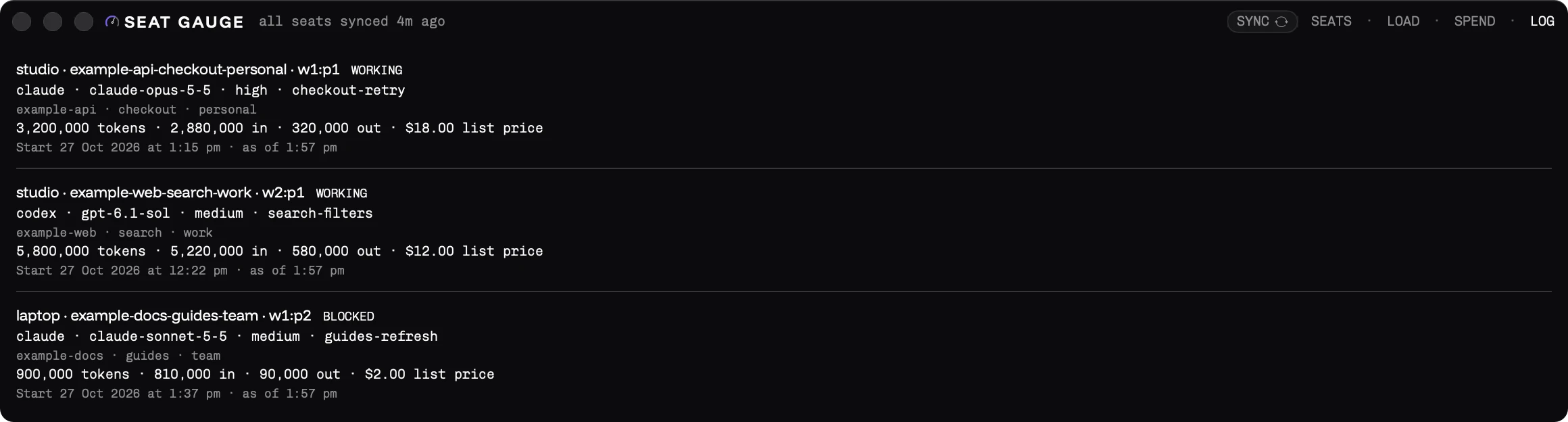
Checking a normal login costs nothing. Seat Gauge asks the account the way you would and runs no AI work. Other tabs show how busy your Macs are, how much each account has used in tokens or list-price dollars, and a log of each agent session.
It's free and open source, for macOS. You build it yourself from the code.
Seat Gauge is a Swift 6.2 package built with the Command Line Tools alone, with no Xcode project. It has three targets. SeatGaugeCore imports only Foundation and holds every rule, so it's testable without a screen. SeatGauge is the AppKit window with SwiftUI cards. seatgauge-cli runs the same core headless.
It reads seats through their own CLIs and never touches the Keychain or refreshes a token. The app reads a Claude seat with its own login by starting claude -p under that seat's profile folder and asking for usage, with no model turn. It reads a Codex seat from codex app-server's rate limits. Each CLI's output has one parser (ClaudeUsageParser.swift, CodexRateLimitsParser.swift), and a ProcessRunning protocol lets the tests replay fixture transcripts in place of a real CLI.
Seats live in seats.json. Domain.swift picks the best seat: the one whose tightest window has the most headroom. The default poll is every five minutes. Spend comes from the local Claude Code transcripts and Codex rollouts, rolled up into hourly cells in spend.csv by SpendCoordinator.swift under a file lock. The LOAD tab reads CPU, memory, disk and herdr agent counts for this Mac and others over ssh (MachineLoad.swift).
For agents, it writes headroom.json, machines.json and log.json to Application Support, so an agent can see which seat has room without spending a seat to check. skills/seat-gauge/ is a ready-made skill that reads them. make check runs the build, tests and a privacy scan. The app is signed ad hoc. Licence AGPL-3.0-only from 0.2.0.
Install it and start it
Install
git clone https://github.com/LaunchAstro/seat-gauge.git
cd seat-gauge
make install
From README.md at a259981
xcode-select --installFrom README.md at a259981
Start
make run # make app, then open itFrom README.md at a259981
seatgauge-cli read # read every seat once and print itFrom README.md at a259981